Feature · Cockpits

Cockpits — run your sales team on facts

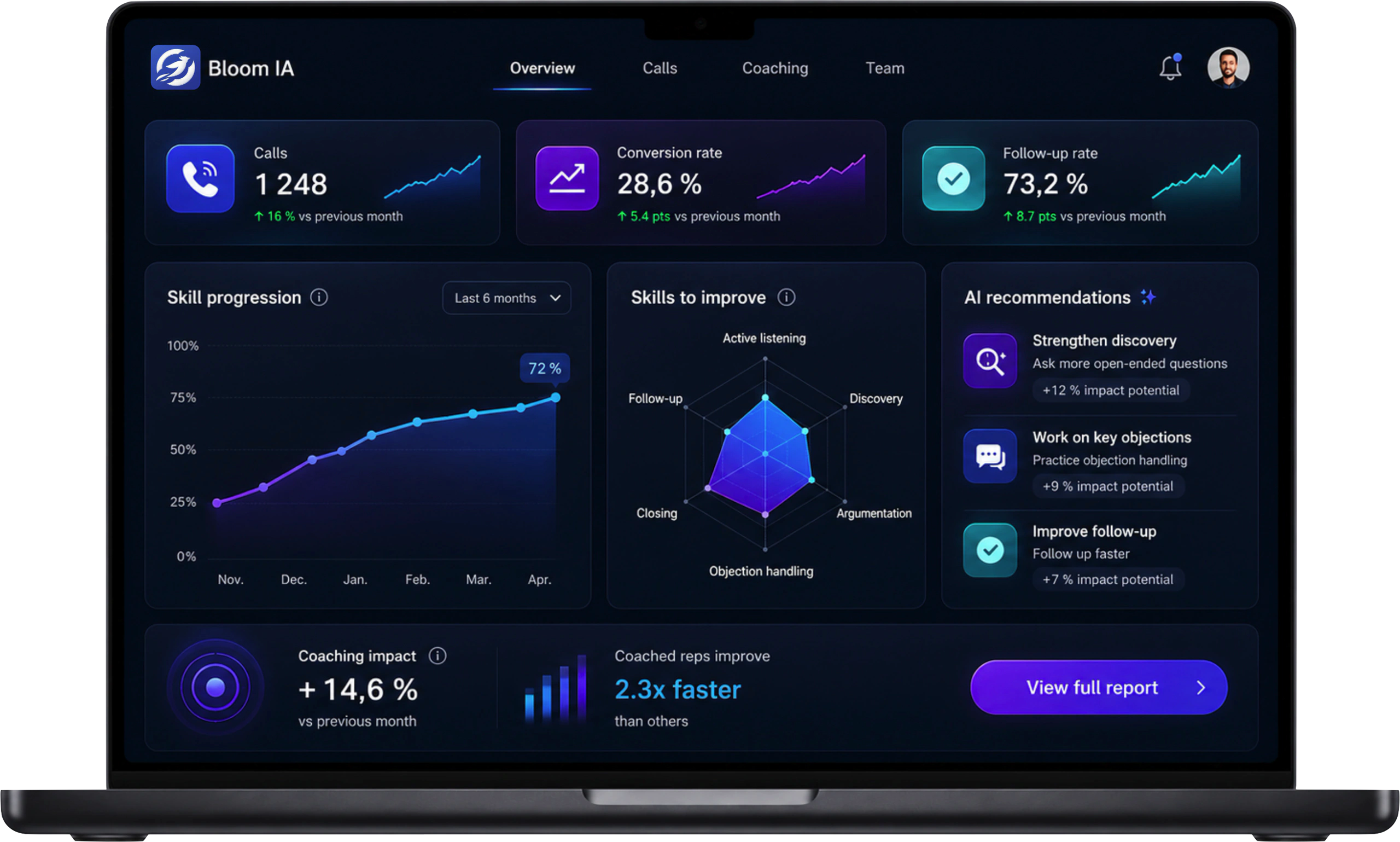
Bloom AI cockpit on a laptop showing call volumes, conversion rate and the team's skill progression

Volumes, conversion, every rep's progress: what actually happens in the field, gathered in one cockpit that stays current on its own.

Book a demo

Without Bloom AI · Friday evening

The week is over. What matters stays invisible.

  • Your top reps, invisible
  • Who's slipping, spotted too late
  • Who to coach, decided on gut feeling

How it runs

Nothing to enter, everything becomes visible.

Every call feeds the cockpit on its own: the numbers get captured, centralized and displayed without a single report being filled in. What stayed invisible on Friday evening is finally there, in plain sight.

  1. During the call

    Captured at the source

    Duration, outcome, objections, skills at play: your Bloom AI telephony records every signal of the conversation. Nobody fills anything in.

  2. Seconds later

    Centralized on its own

    Volumes, conversion, follow-ups, progress: every call feeds the same numbers, in the same place, for the rep and for the team alike.

  3. Continuously

    Finally visible

    The cockpit is already current: the director sees today's picture, the rep finds exactly the same numbers about their own work. Nothing left to guess.

Cockpit view

Cockpit Performance

An overview to decide, a rep's detail to act and the team's progress to sustain momentum. Each level answers one precise question, without rebuilding a report: it is all computed from the calls, continuously.

Team view

Understand the team, at a glance.

Targets, volume, conversion and trends stay on the same time frame. See where the team is accelerating and where to step in before a gap settles in.

  • Compare the current period with previous results
  • Surface wins and signals that need attention
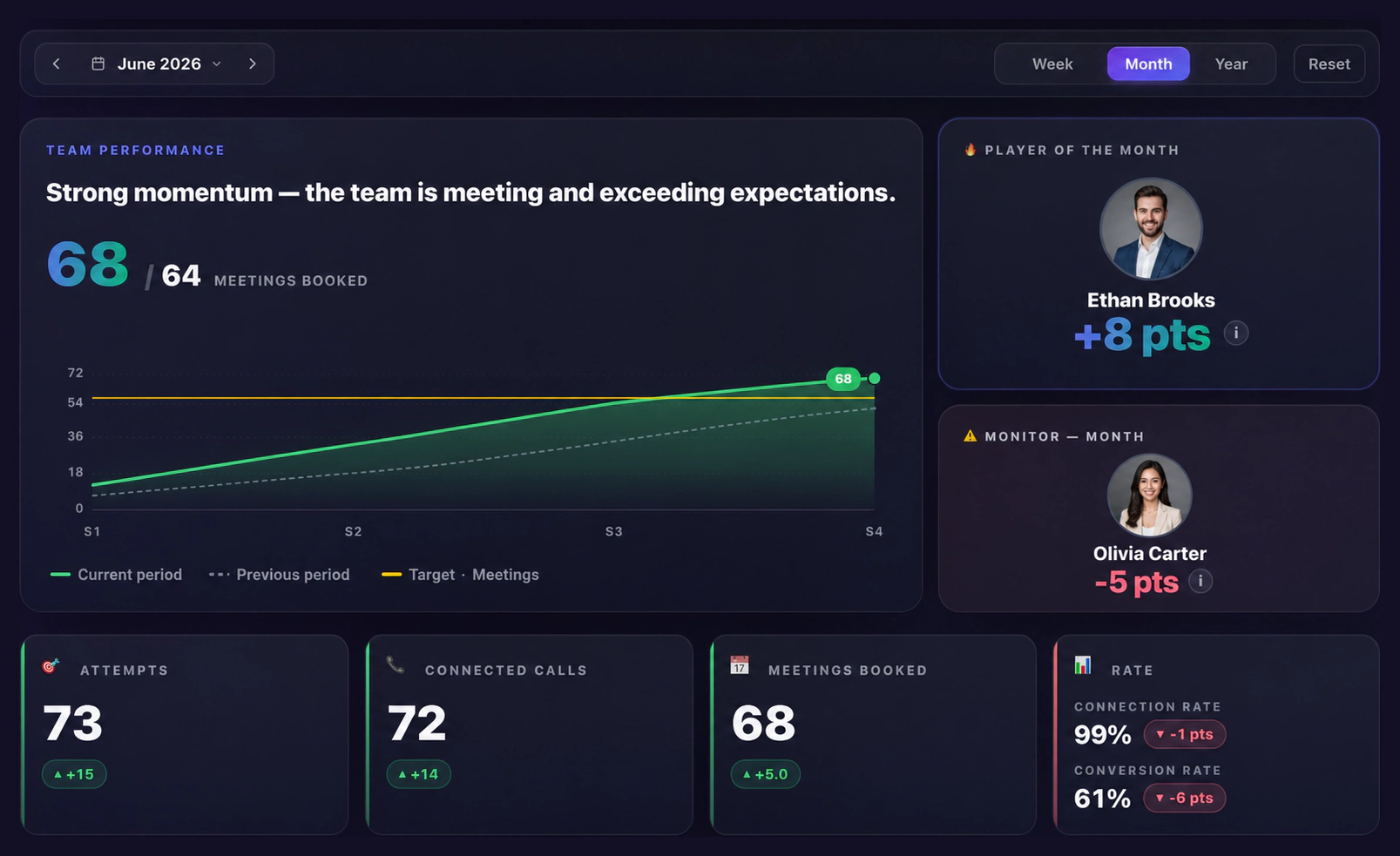
Bloom AI team cockpit showing a performance curve, targets, player of the month and call metrics

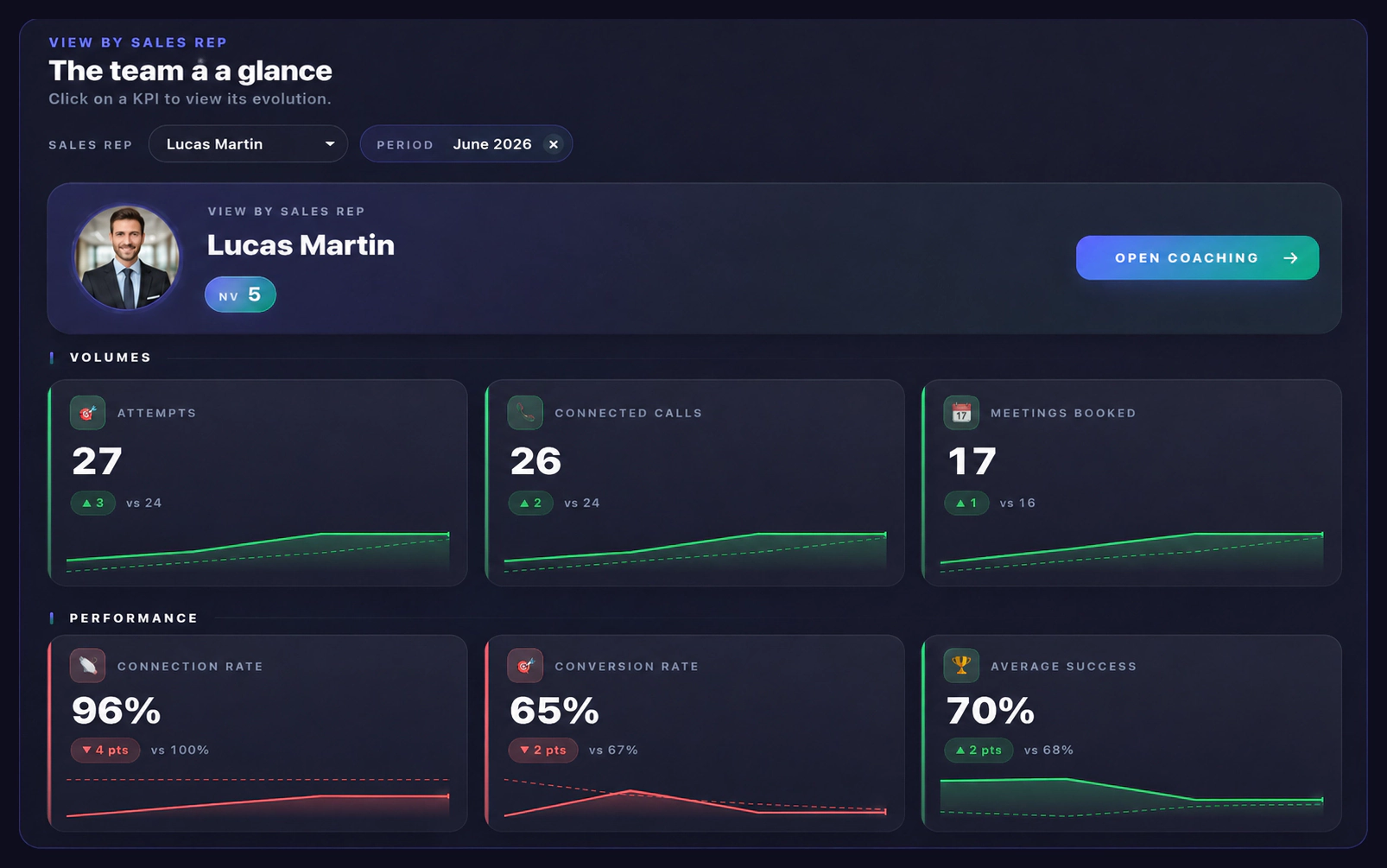
View by sales rep

From the team, to useful detail.

Select a rep and see the metrics behind their result. Volume and rates stay connected to coaching, so you can move from observation to action.

  • Read how every KPI changed over the period
  • Open the rep's coaching from the same view
Bloom AI sales rep view showing call volume, meetings booked, connection rate and conversion rate

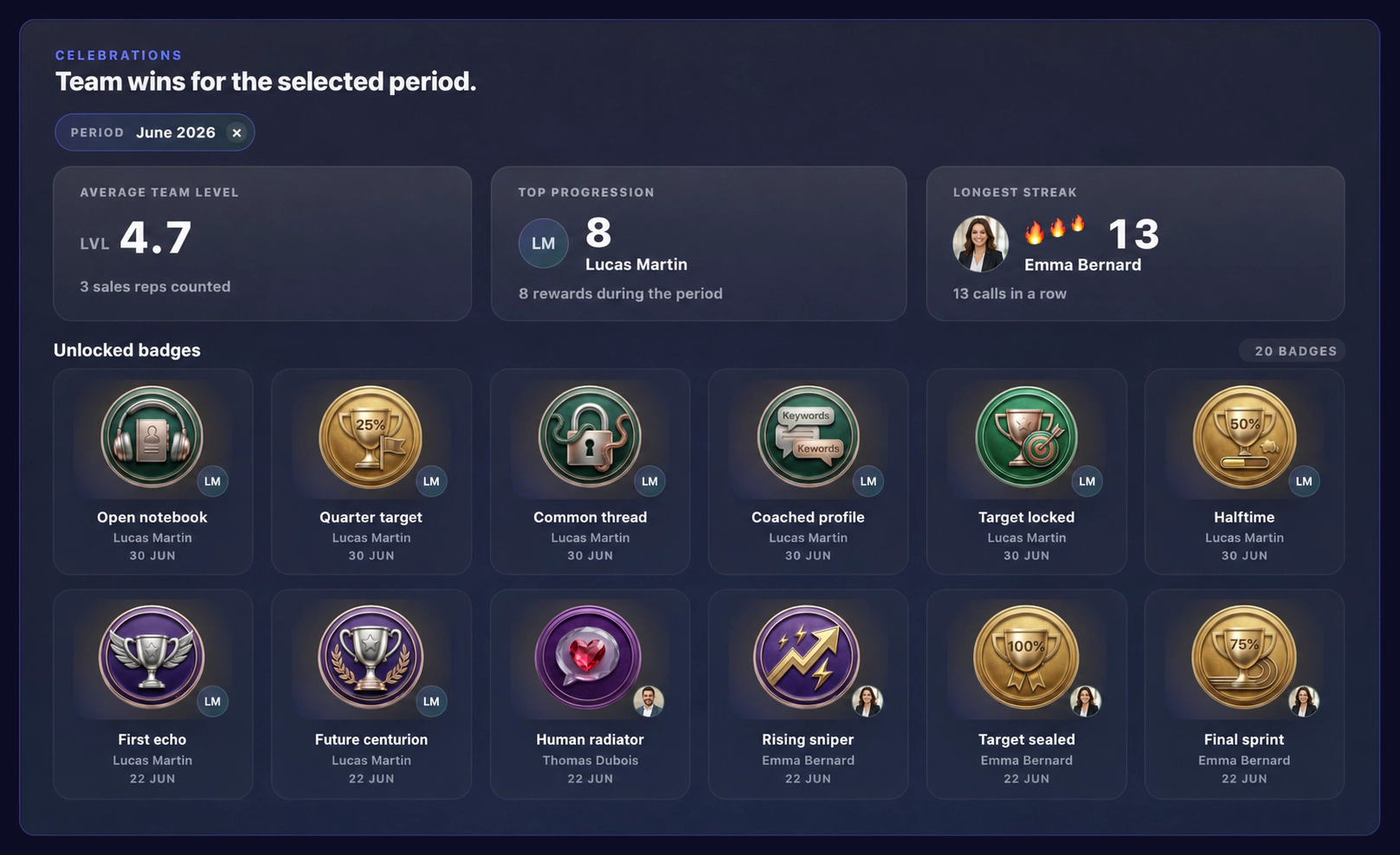
Celebrations

Progress, as a game.

Badges unlocked, streaks running, levels climbing: every call moves the rep up a notch. Effort takes a concrete shape and good habits become shared momentum.

  • Level up as challenges get cleared
  • Celebrate observable progress, not impressions
Bloom AI celebrations view showing average team level, top progression, longest streak and unlocked badges

Cockpit Skills

The result tells you what happened, skills tell you why. Every call is scored against the same criteria, period after period, and each rep's progress becomes readable — without a single score to enter.

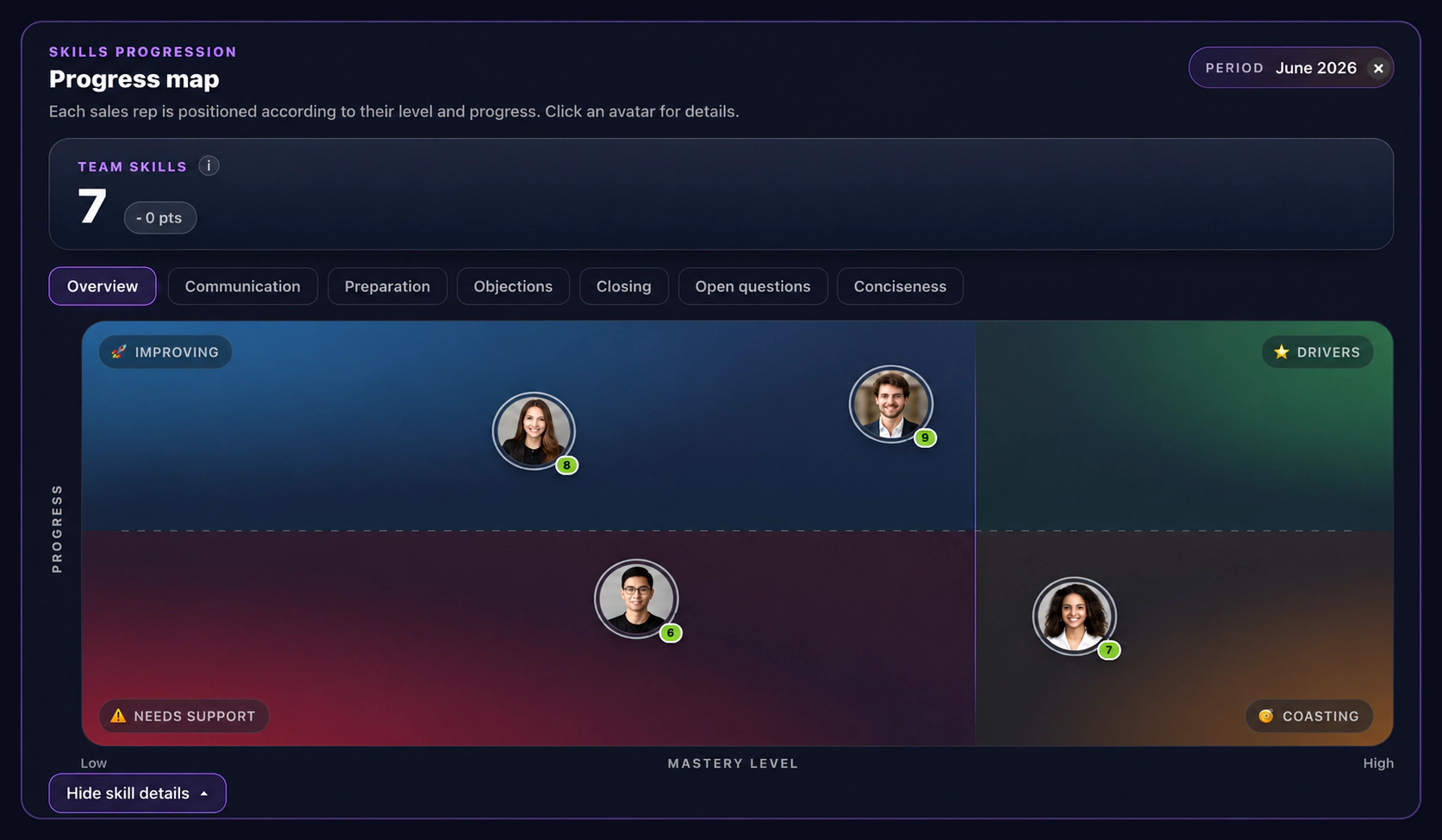
Progress map

Who is progressing, who is slipping.

Each rep is placed by mastery level and by progress over the period. Four quadrants are enough to see who drives the team, who is climbing, who is coasting and who needs support.

  • Filter the map skill by skill
  • Open a rep's detail with one click on their avatar
Bloom AI skills progress map placing every sales rep by mastery level and progress across four quadrants

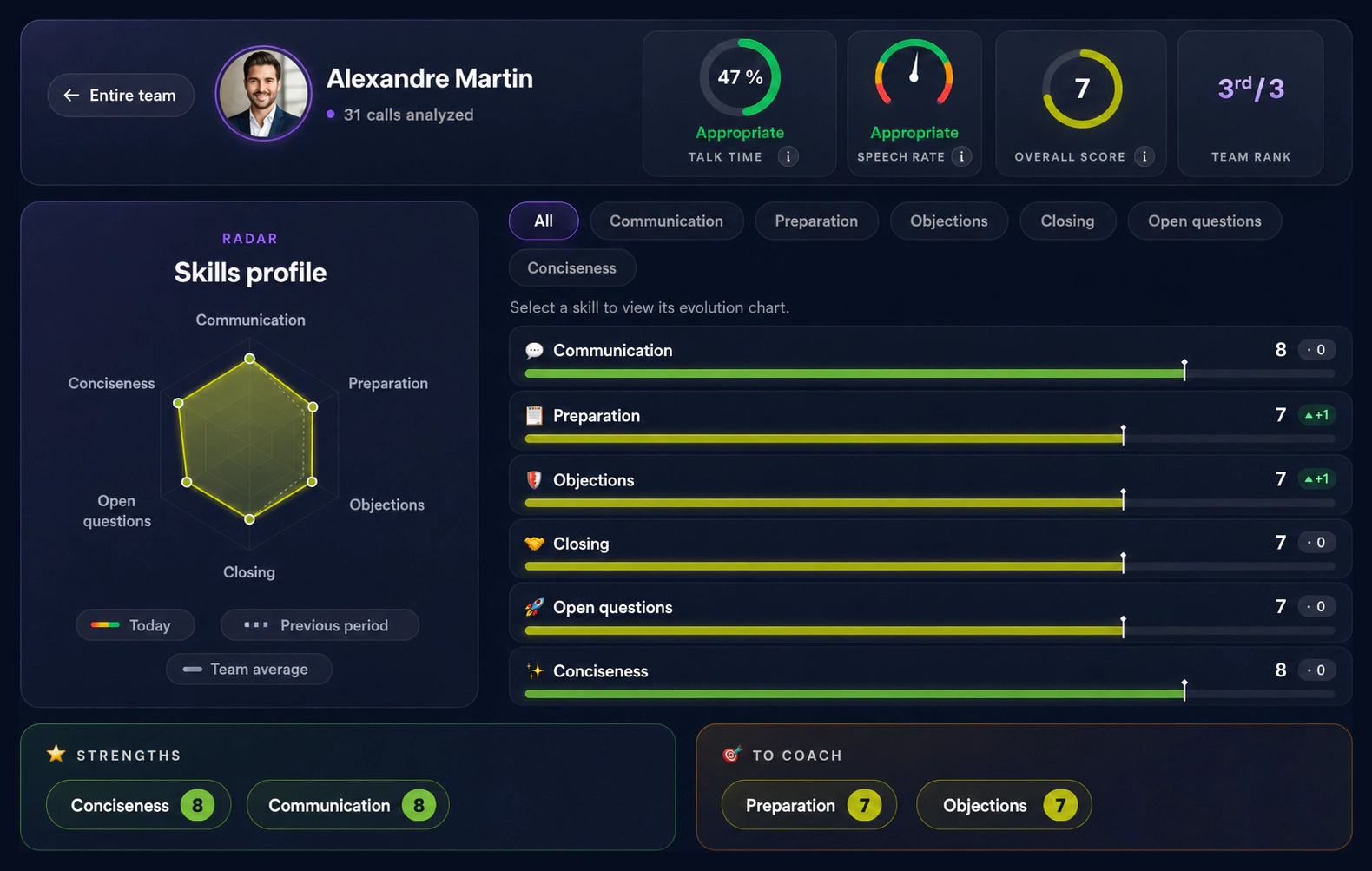
Individual profile

The detail that makes coaching obvious.

A radar of the six skills, compared with the previous period and the team average, plus talk time and speech rate: enough to prepare a one-to-one in two minutes, without replaying a single call.

  • Compare today's profile with the previous period
  • Tell strengths apart from coaching points
Bloom AI skills profile for one sales rep: six-skill radar, talk time, speech rate, overall score, strengths and coaching points

Cockpit Market

Your calls already hold the market research nobody has time to run. Bloom AI pulls out what keeps coming back, what blocks the deal and what is shifting — ranked by impact. Nothing to collect: it all comes from conversations you have already had.

Field frictions

What blocks, what's rising.

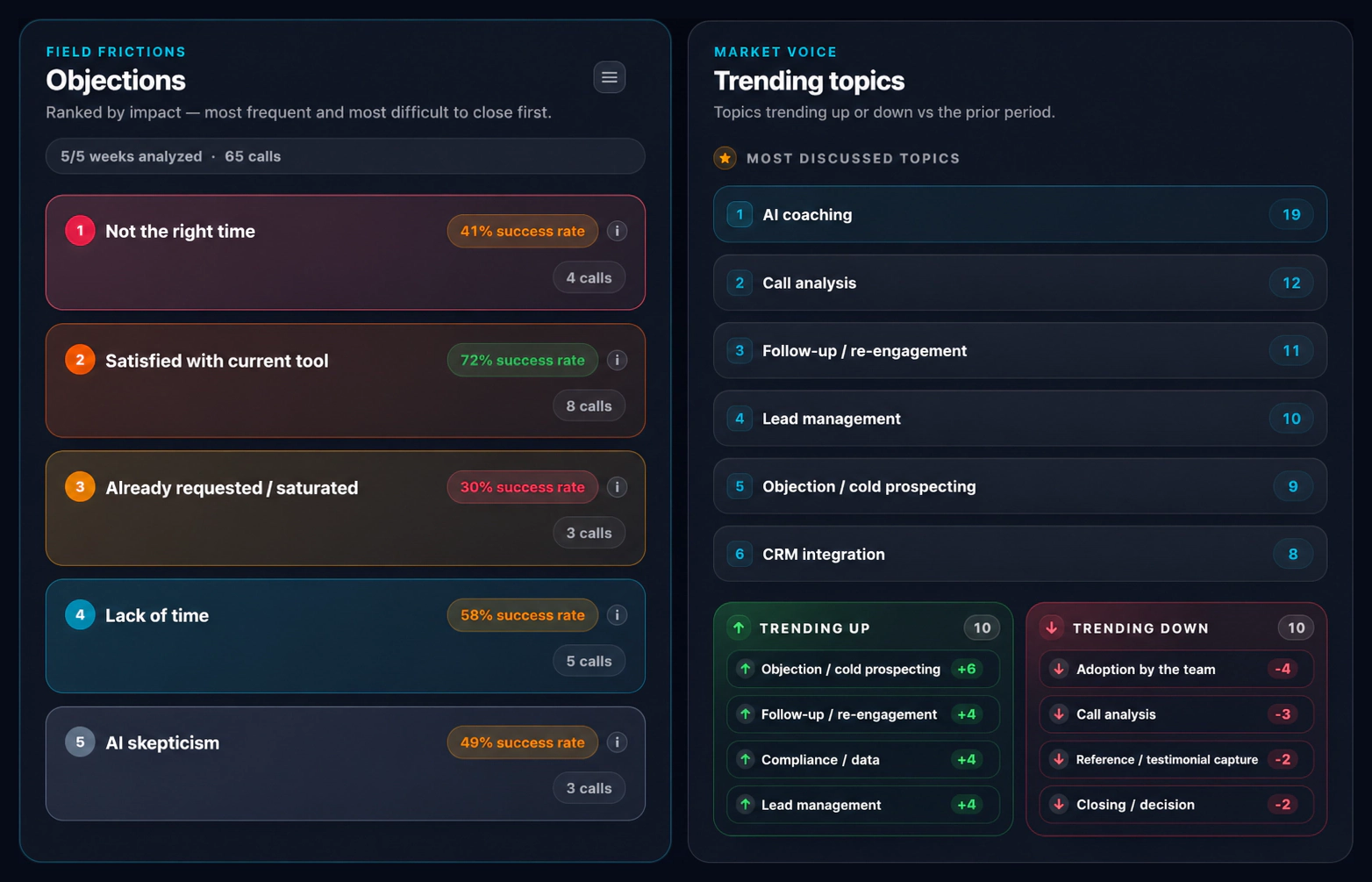
Objections ranked by impact: the ones that come back most and close least. Then the topics that actually fill your calls, the ones climbing and the ones fading. Your market, told by your own conversations.

  • Prioritize objections that are frequent and rarely closed
  • Spot the topics on the rise and the ones fading
Bloom AI market cockpit: objections ranked by impact with their success rate, and most discussed topics trending up and down

Lost deals

Why it did not close.

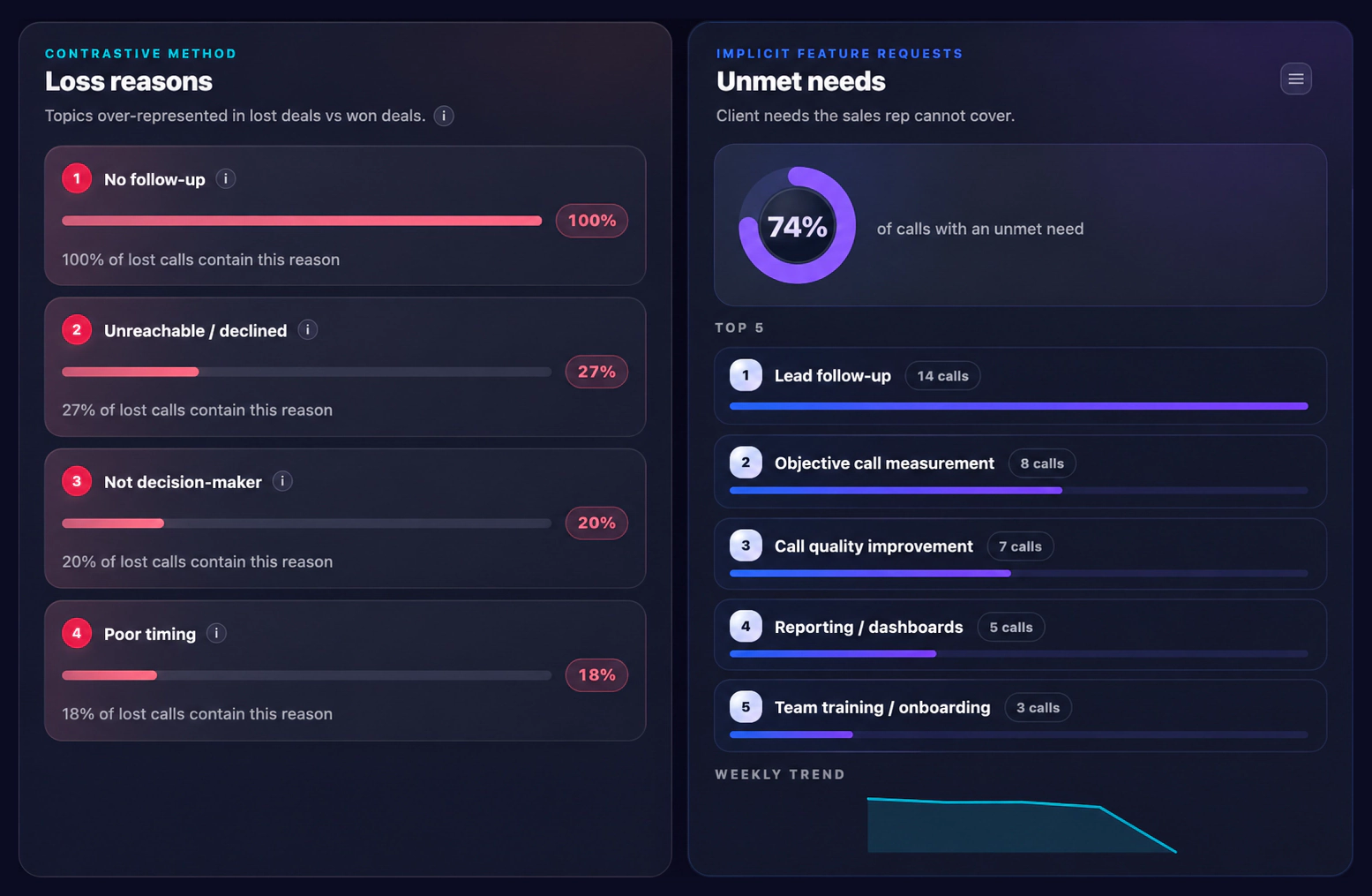
The reasons over-represented in lost deals compared with won ones, and the needs a client voices that the rep cannot answer.

  • Compare lost deals with won deals, not with a hunch
  • Feed unmet client needs back to the product
Bloom AI market cockpit: loss reasons over-represented in lost deals and the top five unmet client needs

Price pressure

Your price, passes or blocks.

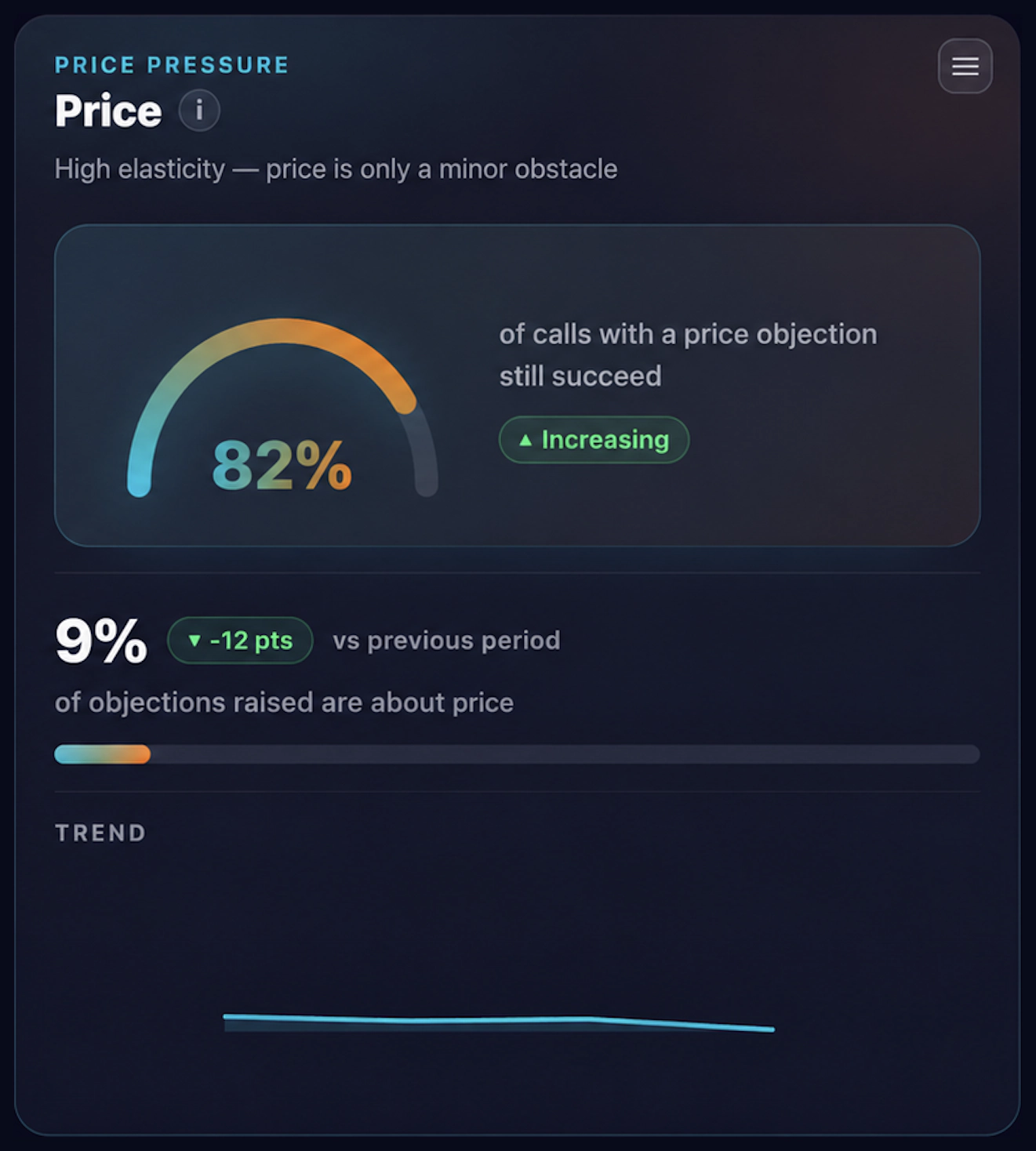
How many calls run into the price, and how many close anyway. That is the whole read: the higher that pass rate, the more the market accepts your price. When it collapses, a discount gets argued on numbers, not on a feeling.

  • A high pass rate means the market accepts your price
  • Track the share of calls where price is the blocker
Bloom AI market cockpit: price pressure with the success rate despite a price objection and the share of objections about price

Sales pipeline

Who to call, right now.

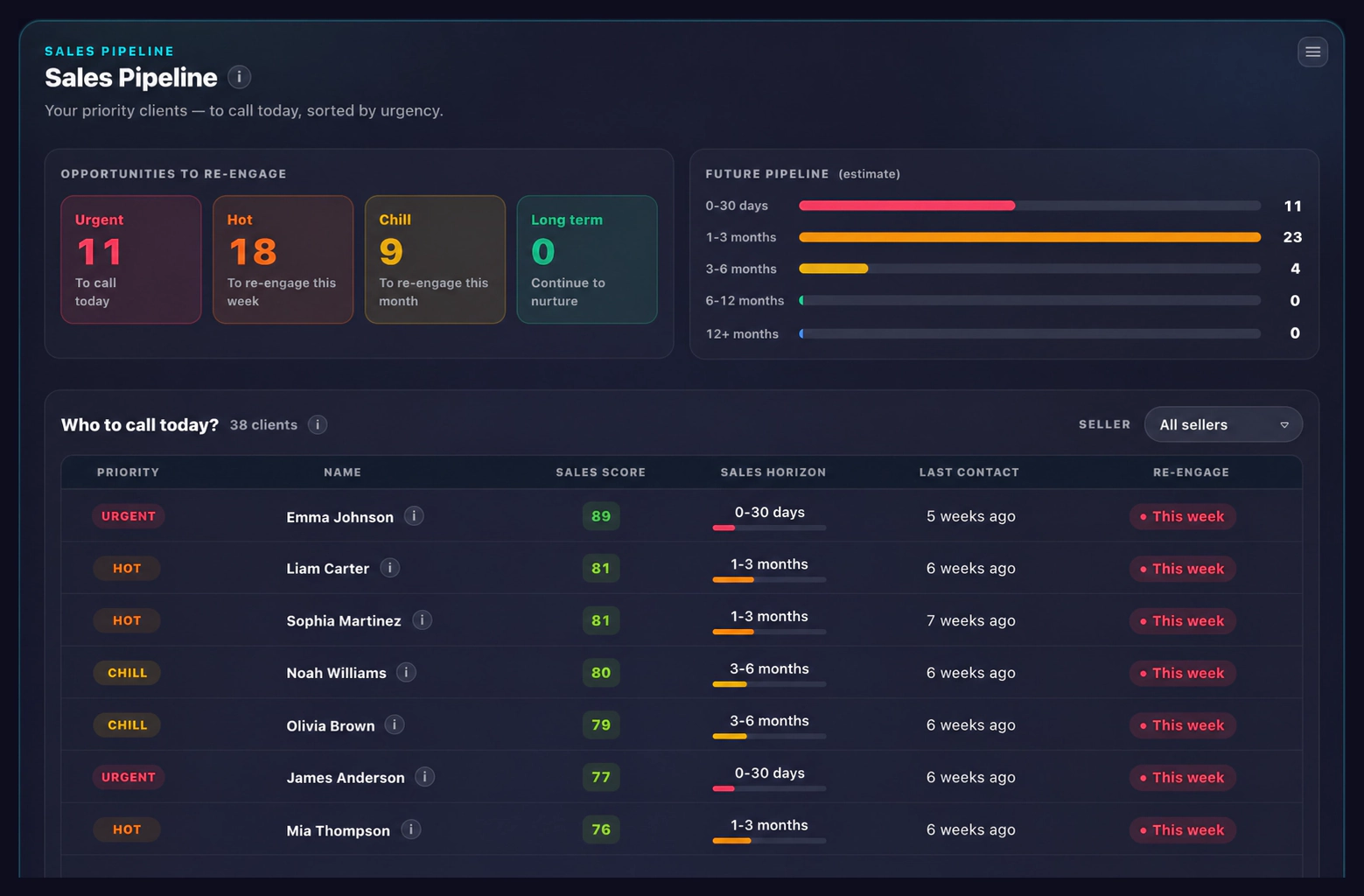
The clients to re-engage, sorted by urgency and sales score, with the estimated buying horizon and the date of the last contact. The list builds itself from the calls: nothing to enter, nothing to sort — a call list, in order.

  • Sort by urgency: today, this week, this month
  • Project the pipeline ahead by buying horizon
Bloom AI sales pipeline: opportunities to re-engage by urgency, future pipeline by horizon and the list of clients to call today

Stages and delays

The leak, and the lag.

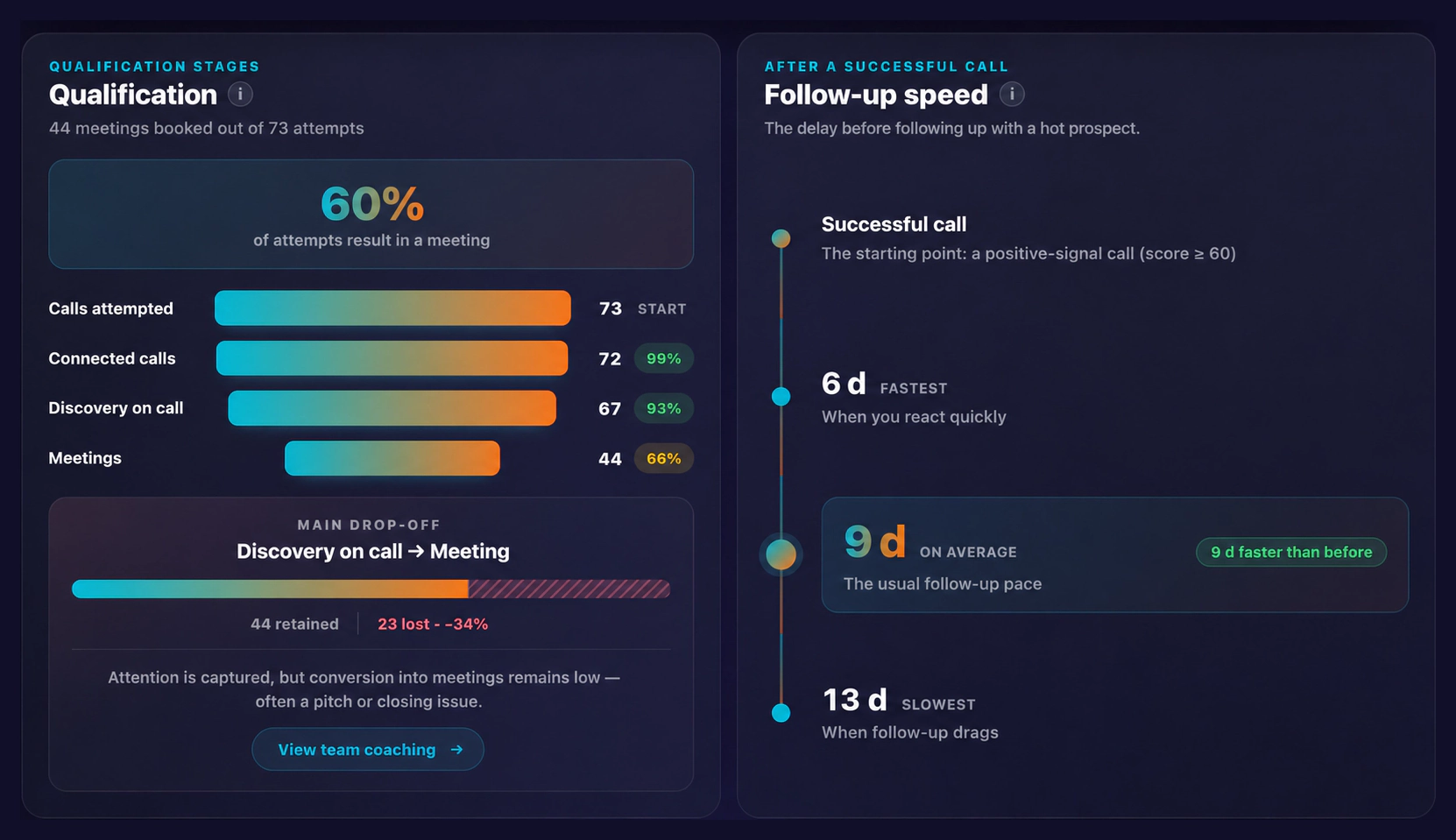
Calls attempted, connected, discovery, meetings booked: every stage shows what it holds. Bloom AI names the main leak, puts a number on what it costs and sends you straight to the coaching. Next to it, how fast your hot prospects get followed up: the fastest, the usual, the slowest.

  • The main leak named, quantified, linked to coaching
  • Your fastest follow-ups against your slowest
Bloom AI market cockpit: qualification funnel from calls attempted to meetings booked, main drop-off and follow-up speed

Cockpit User

The same product, from the rep's seat. Not a report to fill in for their manager: a dashboard that fills itself, call after call, and tells them what to do now, who to call and where they are progressing.

Call signals

Their progress, finally visible.

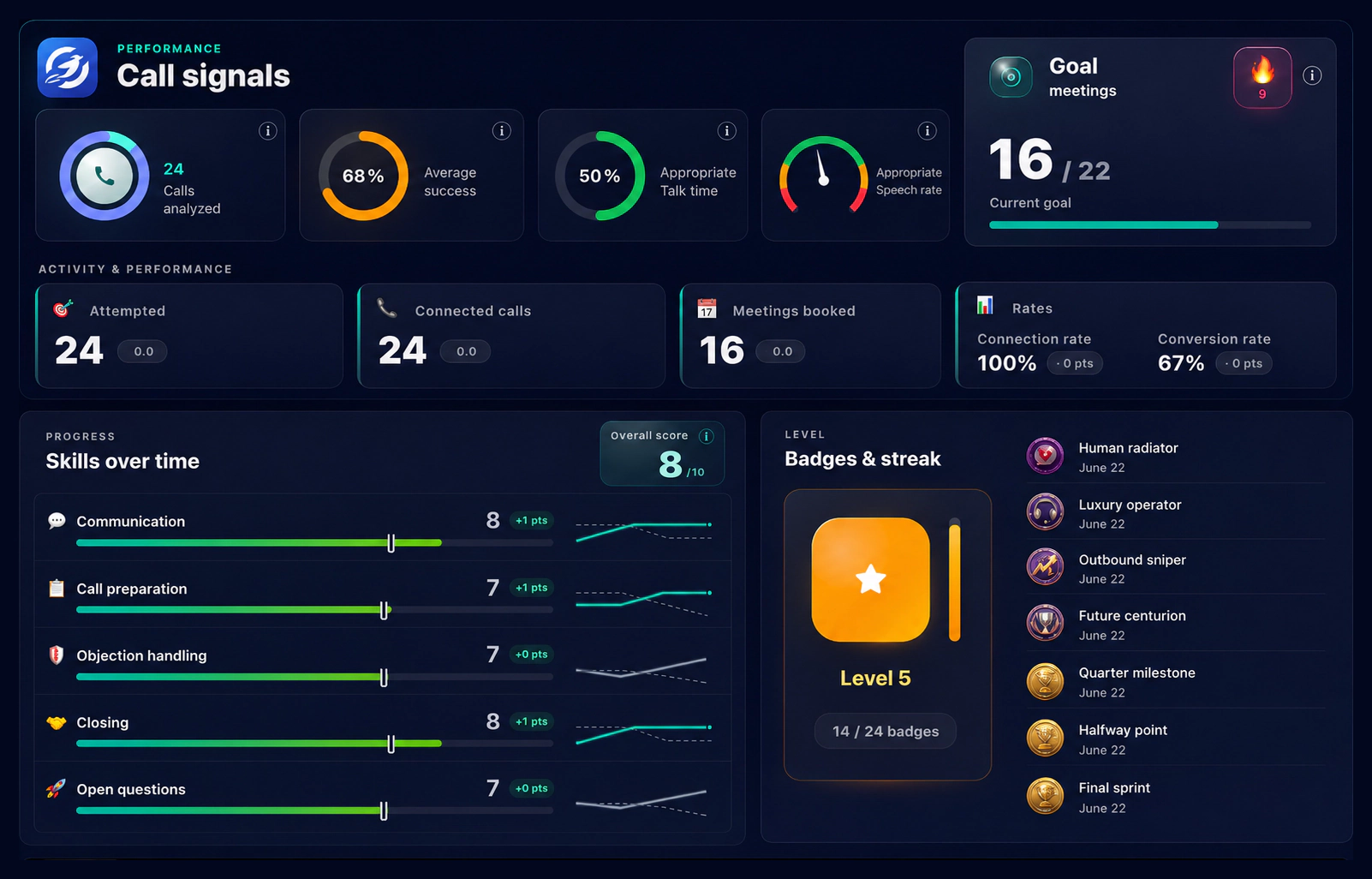
Volume, success rate, talk time, speech rate, the current goal and how every skill moved. The rep sees exactly where they are improving and what is left to work on: skill growth stops being a feeling and becomes a number that climbs.

  • See which skill is climbing and which still needs work
  • Unlock badges on progress that was actually measured
Bloom AI user cockpit: call signals with volume, success rate, talk time, meetings goal, skills over time and badges

Sales pipeline

Their call list, already prioritized.

The same clients the director sees, from the point of view of whoever picks up the phone: who to call back today, with which sales score, which estimated buying horizon and how long since the last contact. Here too, nothing to prepare: the list writes itself after every call.

  • Follow up before a contact goes cold
  • Keep the estimated buying horizon in sight
Bloom AI sales pipeline from the rep's side: opportunities to re-engage by urgency and the list of clients to call today

Today's focus

Their tasks, already written.

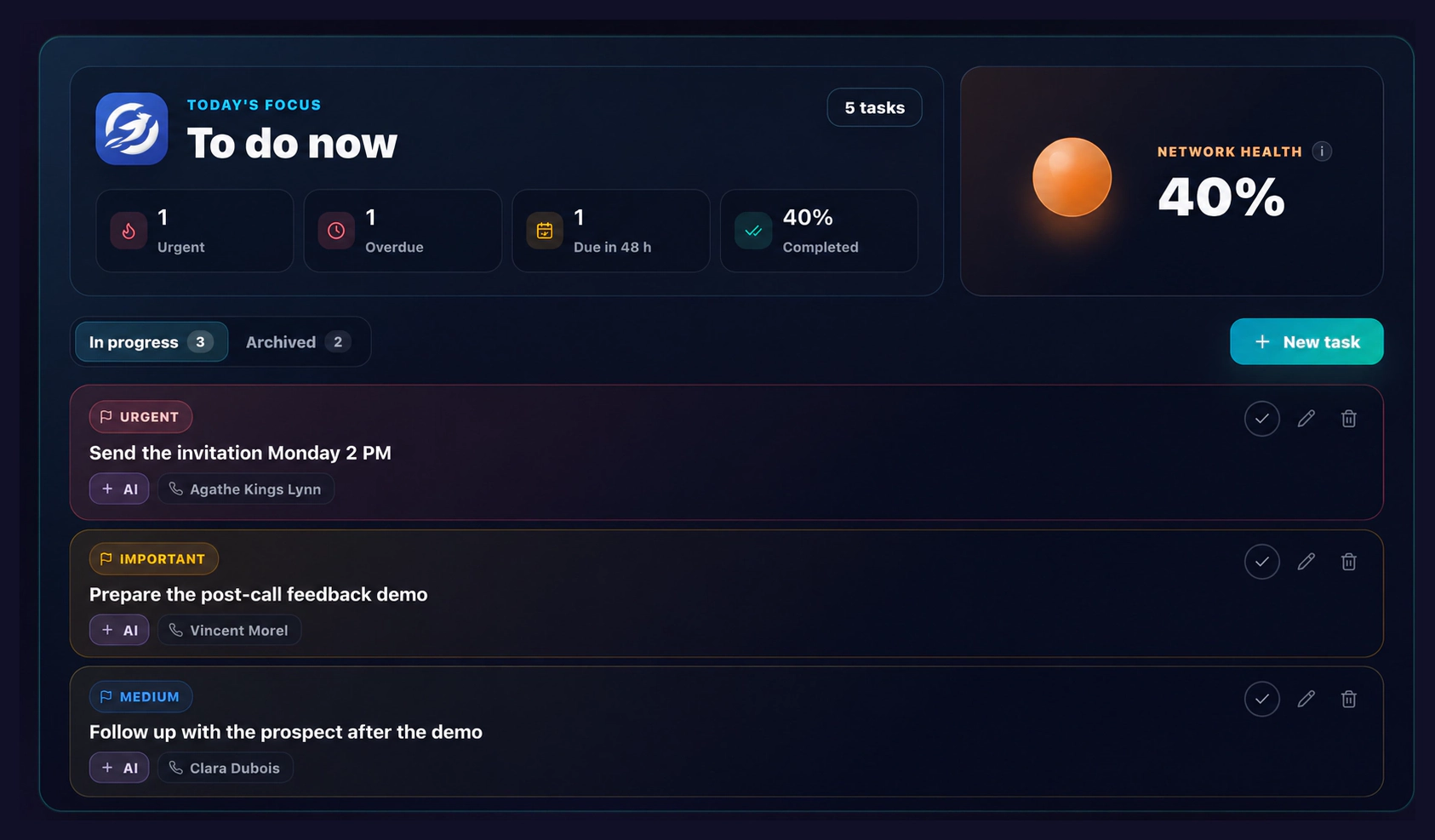
After every call, Bloom AI captures what is left to do and turns it into tasks, ranked by urgency and due date. Nothing to copy over: the ones in the app are exactly these, in the same order, ready to work through.

  • See at a glance what is urgent, overdue or due within 48 h
  • The same tasks in the app and in the cockpit
Bloom AI user cockpit: today's focus with urgent, overdue and 48-hour tasks, network health and the list of tasks in progress

Frequently asked questions

Who sees what in the cockpit?

Managers see their team: volumes, conversion, each rep's progress. Reps open their own cockpit — with exactly the same numbers about themselves. No parallel scoring, no hidden grade: what the manager sees, the rep sees too.

Does anyone have to enter data for the numbers to exist?

No. Calls run through Bloom AI telephony, so the metrics are captured at the source. Nobody fills in an activity report and nobody consolidates an export: the cockpit fills itself, call after call.

How often is the data refreshed?

Continuously. A finished call lands in the metrics within seconds, and you pick the period you want to see — week, month, quarter or year — without waiting for anything to close.

Can I follow one team or one rep in particular?

Yes. The cockpit filters by period and by rep, and teams are tracked separately. You move from the overview to a single rep's detail without switching tools or rebuilding a report.

Where is my data hosted? Is it Law 25 compliant?

Your data is encrypted in transit and at rest, and hosted in Canada. Bloom AI complies with GDPR and Quebec's Law 25; guaranteed data residency is available on the Enterprise plan.

How is this different from a CRM dashboard?

A CRM dashboard shows what your reps chose to type in. The Bloom AI cockpit measures what actually happened on the calls — and it shows you the skill to work on, not just the number you hit.

Ready to steer on facts?

See the Bloom AI cockpit running on your own sales metrics — personalized demo, no commitment.

Book a demo
  • Set up in minutes
  • Your data stays private
  • No commitment
Sell without limits 🚀 Step into the future of sales
Book a demo 👇 Tell us everything 💬